
End-to-End Encryption (E2EE): How It Works and Why It Matters
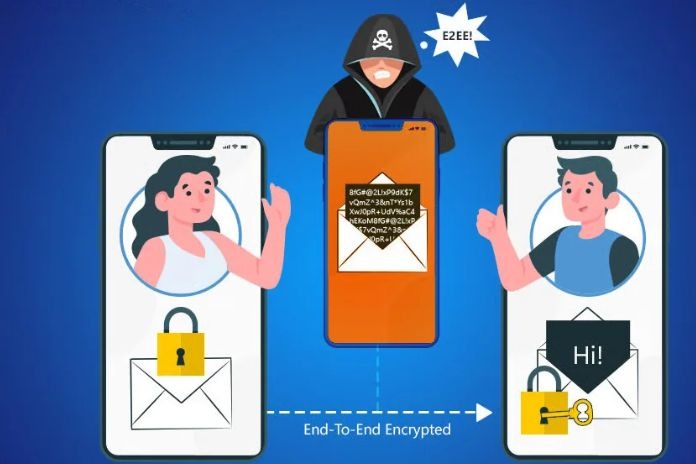
An envelope, sometimes sealed, protects paper letters during transit. Early Internet communication began without such protection. Emails and website content were sent in plain text. Anyone who intercepted the data could simply read along.
Today, much of the data sent over the internet is protected by transport encryption, commonly using TLS (Transport Layer Security). Anyone intercepting the encrypted data in transit should not be able to read its contents without the necessary decryption keys. However, the message is readable on the servers that send and receive the content. With transport encryption alone, service providers can generally access the content on their servers and may disclose it to authorities when legally required.
If, on the other hand, content is end-to-end encrypted, it is only readable on the devices that communicate with each other. Service providers and attackers who access encrypted server data should not be able to read its contents without the necessary decryption keys. However, end-to-end encryption does not protect against compromised devices or other security weaknesses.
How Does End-to-End Encryption Work?
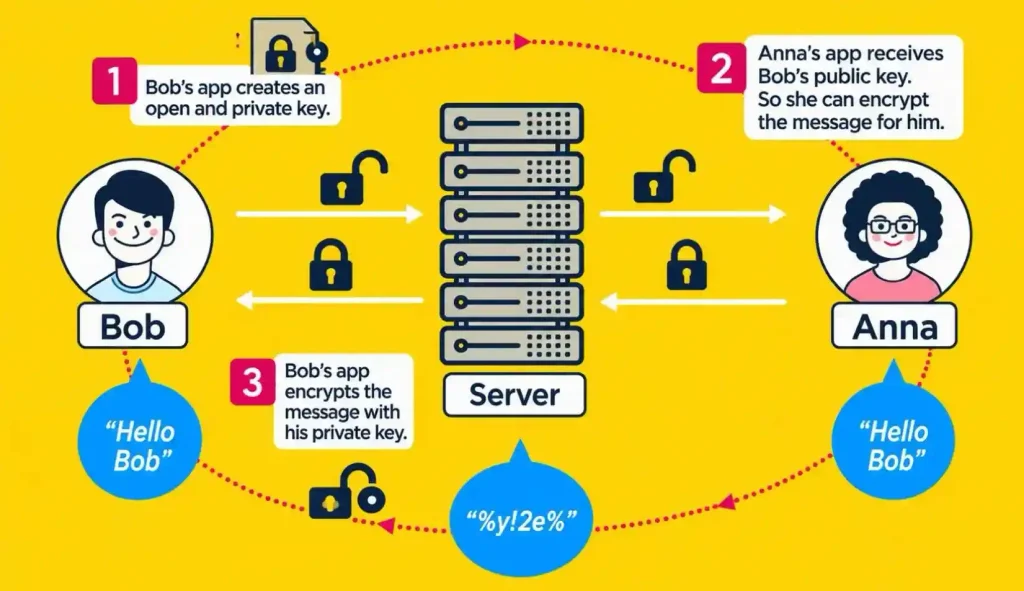
End-to-end encryption is commonly abbreviated as “E2EE.” Many end-to-end encryption systems use public-key cryptography or a combination of asymmetric and symmetric encryption. Examples include PGP, S/MIME, and the Signal Protocol, which Signal and WhatsApp use and which other messaging services have also used.
The process involves the use of a key pair consisting of a public and a private key.
Here’s how it works: Anna sends Bob a message, for example, using a messenger app that encrypts messages end-to-end. Anna’s app encrypts the message she sends Bob with his public key. This key was generated by Bob’s app. Anna’s app obtains Bob’s public key before sending the message. The key must also be authenticated to ensure that it really belongs to Bob.
The public key can be imagined as an open padlock. Bob can give this lock to anyone, as it is only suitable for encrypting messages to him. Only Bob can open the lock again—with his private key (sometimes it’s a set of keys). The decrypted message is always only available to him.
This so-called public-key method has the advantage that private keys are generally kept on the user’s device and are not transmitted during normal communication. This reduces the risk of interception, although compromised devices can still expose private keys.
Encrypted Services in Everyday Life – Our Tips
End-to-End Encryption for Emails
Email services commonly use transport encryption, but this does not provide end-to-end encryption by default. However, there are email clients that make end-to-end encryption for emails quite easy.
There are also dedicated email apps for smartphones that offer end-to-end encryption. Alternatively, you can download an encryption app and integrate it with your existing email app (see “Tip” below).
Most of these programs use one of the two most common end-to-end encryption methods: PGP (Pretty Good Privacy) or S/MIME (Secure/Multipurpose Internet Mail Extensions). Unfortunately, these methods are not yet compatible with each other, which complicates standardized end-to-end encryption. Unlike messaging apps, emails travel through the servers of different providers, so end-to-end encryption cannot simply be set up centrally for everyone.
Tip: The Thunderbird email client includes built-in support for OpenPGP and S/MIME encryption.
End-to-End Encryption in Messaging Apps
End-to-end encryption (E2E) is commonly implemented in messaging apps. Signal, Threema, WhatsApp, and Apple’s iMessage, for example, use E2E encryption by default. Telegram’s regular cloud chats do not use E2E encryption by default; only its Secret Chats do.
How the Signal Protocol Protects Messages
The Signal Protocol is widely recognized as an important end-to-end encryption protocol used in modern messaging applications. It supports end-to-end encrypted communication even when recipients are offline. It also uses a process called key ratcheting to regularly derive new encryption keys. This helps protect previously exchanged messages if a later key is compromised, provided the attacker does not have access to the necessary earlier key material or a compromised device.
End-to-End Encryption in Video Chats
End-to-end encryption for video chats is particularly challenging because large amounts of audio and video data must be transmitted securely. Apple users can communicate with each other using FaceTime, which supports end-to-end encryption. The encryption features of other video conferencing services vary.
Tip: Signal supports end-to-end encrypted group voice and video calls. Check Signal’s official support documentation for the current participant limit and supported features.
End-to-End Encryption in Cloud Storage
Popular services like Dropbox, Google Drive, and OneDrive do not provide end-to-end encryption by default. iCloud uses standard data protection by default, under which only certain data categories are end-to-end encrypted. Apple’s optional Advanced Data Protection feature extends end-to-end encryption to additional categories of iCloud data.
Tip: Some cloud storage providers offer end-to-end encryption. With the Cryptomator app, you can encrypt files before uploading them to supported cloud storage services.
How Secure Is End-to-End Encryption?
End-to-end encryption protects the content of your messages, but metadata can still be collected. Messaging services may collect information such as account identifiers, device details, IP addresses, and communication timestamps. The specific information collected varies between services. This data alone can reveal information about your communication patterns.
There is also a risk that attackers could impersonate message recipients or carry out man-in-the-middle attacks if encryption keys are not properly verified. Security vulnerabilities can be exploited to compromise devices, potentially exposing private keys and messages. Therefore, you should always keep your operating system and all installed apps up to date and install updates immediately.
Why Open-Source Encryption Apps Matter
Open-source apps like Signal Messenger allow independent security researchers to examine their publicly available code. However, open-source availability alone does not guarantee security. Regular security audits, proper implementation, and timely updates are also important.
Important: The best encryption is useless if the device sending and receiving messages isn’t protected itself. A strong screen lock helps protect the contents of your smartphone from unauthorized access if the device is lost or stolen. Otherwise, anyone who gets their hands on your device can read and forward them.
Also Read: How Can You Protect Your Online Accounts from Hacking Attacks